
Working with Externally Created Candidate Datasets
Source:vignettes/imported_datasets.Rmd
imported_datasets.RmdCandidate datasets outside Betwixt
Betwixt does not require candidate datasets to be created programmatically. A candidate dataset is a tabular data structure that follows the Betwixt candidate-data contract. It may therefore be prepared in Excel or LibreOffice, generated by another statistical application, exported from a database, or produced by a workflow written in another programming language.
This vignette demonstrates this workflow using a small statistical dataset containing GDP observations for Iceland and Malta for two reference years. The example is intentionally small enough to inspect and edit manually.
##   row_number                         evidence_url        label
## 1          1 https://doi.org/10.2908/NAIDA_10_GDP Iceland 2023
## 2          2 https://doi.org/10.2908/NAIDA_10_GDP Iceland 2024
## 3          3 https://doi.org/10.2908/NAIDA_10_GDP   Malta 2023
## 4          4 https://doi.org/10.2908/NAIDA_10_GDP   Malta 2024
##                                        description subject
## 1 GDP at market prices in Iceland in the year 2023 Iceland
## 2 GDP at market prices in Iceland in the year 2024 Iceland
## 3   GDP at market prices in Malta in the year 2023   Malta
## 4   GDP at market prices in Malta in the year 2024   Malta
##                       subject_definition country_code
## 1 https://www.geonames.org/countries/IS/           IS
## 2 https://www.geonames.org/countries/IS/           IS
## 3 https://www.geonames.org/countries/MT/           MT
## 4 https://www.geonames.org/countries/MT/           MT
##                           country_code_definition     gdp
## 1 https://www.iso.org/iso-3166-country-codes.html 139.157
## 2 https://www.iso.org/iso-3166-country-codes.html 140.144
## 3 https://www.iso.org/iso-3166-country-codes.html 139.157
## 4 https://www.iso.org/iso-3166-country-codes.html 140.144
##                                                gdp_definition context_year
## 1 http://dd.eionet.europa.eu/vocabulary/eurostat/na_item/B1GQ         2023
## 2 http://dd.eionet.europa.eu/vocabulary/eurostat/na_item/B1GQ         2024
## 3 http://dd.eionet.europa.eu/vocabulary/eurostat/na_item/B1GQ         2023
## 4 http://dd.eionet.europa.eu/vocabulary/eurostat/na_item/B1GQ         2024
##   context_unit
## 1      CP_MEUR
## 2      CP_MEUR
## 3      CP_MEUR
## 4      CP_MEUR
The same dataset can be downloaded from usebetwixt.com/examples and opened in a spreadsheet application.
Understanding the example
Each row represents an observation about a country in a particular year.
The subject column contains the human-readable country
name, while subject_definition provides a resolvable
GeoNames identifier for that country. The country_code
column provides its ISO 3166-1 alpha-2 code.
The gdp column contains the statistical value. Its
gdp_definition identifies the Eurostat national-accounts
concept B1GQ, gross domestic product at market prices. The
evidence_url points to the DOI of the Eurostat dataset from
which the observations were obtained.
Columns prefixed with context_, such as
context_year and context_unit, provide
row-level context needed to interpret an observation. They are preserved
and displayed during review but are not themselves candidate assertions
and do not receive a review status.
This separation is important. A value such as a country name or GDP figure may be easy for a person to recognise, while its definition, evidence, and observational context make its intended interpretation explicit.
Extend the dataset in a spreadsheet
Download the example dataset and open it in Excel, LibreOffice, or another spreadsheet application.
Suppose we use the same Eurostat source to add Luxembourg for the same two reference years. We add the country name, its GeoNames identifier, country code, and two GDP observations while retaining the existing GDP definition, unit, and evidence source.
After saving the edited spreadsheet, it can be read back using the ordinary tool appropriate for its file format. For example:
candidates <- readxl::read_excel("small_countries_dataset.xlsx")You can download the CSV serialisation of the dataset at http://usebetwixt.com/examples/small_countries_dataset.xlsx.
For a CSV file, the equivalent operation could use base R:
candidates <- utils::read.csv("small_countries_dataset.csv")You can download the Excel version of the dataset at http://usebetwixt.com/examples/small_countries_dataset.csv.
Betwixt does not provide a special import function. The same principle applies outside R: a Python workflow might use pandas, while another application may use its own standard tabular-data tools.
For the remainder of this vignette, we reproduce the result of the spreadsheet edit directly so that the example is executable.
candidates <- rbind(
  small_countries_dataset,
  data.frame(
    row_number = 5:6,
    evidence_url = rep(
      "https://doi.org/10.2908/NAIDA_10_GDP", 2
    ),
    label = c("Luxembourg 2023", "Luxembourg 2024"),
    description = c(
      "GDP at market prices in Luxembourg in the year 2023",
      "GDP at market prices in Luxembourg in the year 2024"
    ),
    subject = rep("Luxembourg", 2),
    subject_definition = rep(
      "https://www.geonames.org/countries/LU/", 2
    ),
    country_code = rep("LU", 2),
    country_code_definition =
      "https://www.iso.org/iso-3166-country-codes.html",
    gdp = c(82115.5, 86180.3),
    gdp_definition =
      "http://dd.eionet.europa.eu/vocabulary/eurostat/na_item/B1GQ",
    context_year = c(2023L, 2024L),
    context_unit = rep("CP_MEUR", 2)
  )
)

candidates
## row_number evidence_url label
## 1 1 https://doi.org/10.2908/NAIDA_10_GDP Iceland 2023
## 2 2 https://doi.org/10.2908/NAIDA_10_GDP Iceland 2024
## 3 3 https://doi.org/10.2908/NAIDA_10_GDP Malta 2023
## 4 4 https://doi.org/10.2908/NAIDA_10_GDP Malta 2024
## 5 5 https://doi.org/10.2908/NAIDA_10_GDP Luxembourg 2023
## 6 6 https://doi.org/10.2908/NAIDA_10_GDP Luxembourg 2024
## description subject
## 1 GDP at market prices in Iceland in the year 2023 Iceland
## 2 GDP at market prices in Iceland in the year 2024 Iceland
## 3 GDP at market prices in Malta in the year 2023 Malta
## 4 GDP at market prices in Malta in the year 2024 Malta
## 5 GDP at market prices in Luxembourg in the year 2023 Luxembourg
## 6 GDP at market prices in Luxembourg in the year 2024 Luxembourg
## subject_definition country_code
## 1 https://www.geonames.org/countries/IS/ IS
## 2 https://www.geonames.org/countries/IS/ IS
## 3 https://www.geonames.org/countries/MT/ MT
## 4 https://www.geonames.org/countries/MT/ MT
## 5 https://www.geonames.org/countries/LU/ LU
## 6 https://www.geonames.org/countries/LU/ LU
## country_code_definition gdp
## 1 https://www.iso.org/iso-3166-country-codes.html 139.157
## 2 https://www.iso.org/iso-3166-country-codes.html 140.144
## 3 https://www.iso.org/iso-3166-country-codes.html 139.157
## 4 https://www.iso.org/iso-3166-country-codes.html 140.144
## 5 https://www.iso.org/iso-3166-country-codes.html 82115.500
## 6 https://www.iso.org/iso-3166-country-codes.html 86180.300
## gdp_definition context_year
## 1 http://dd.eionet.europa.eu/vocabulary/eurostat/na_item/B1GQ 2023
## 2 http://dd.eionet.europa.eu/vocabulary/eurostat/na_item/B1GQ 2024
## 3 http://dd.eionet.europa.eu/vocabulary/eurostat/na_item/B1GQ 2023
## 4 http://dd.eionet.europa.eu/vocabulary/eurostat/na_item/B1GQ 2024
## 5 http://dd.eionet.europa.eu/vocabulary/eurostat/na_item/B1GQ 2023
## 6 http://dd.eionet.europa.eu/vocabulary/eurostat/na_item/B1GQ 2024
## context_unit
## 1 CP_MEUR
## 2 CP_MEUR
## 3 CP_MEUR
## 4 CP_MEUR
## 5 CP_MEUR
## 6 CP_MEURThe construction above is included only to make the vignette reproducible. In the workflow being demonstrated, these two rows were added in the spreadsheet rather than programmatically in R.
Validate the edited dataset
Reading a file successfully does not guarantee that it conforms to the Betwixt candidate-data contract. Externally created or edited data can therefore be checked before review.
validate_candidate_dataset(candidates)Successful validation returns the dataset invisibly. If the structure is invalid, an error identifies the first validation failure. Otherwise, the dataset is ready for review.
If you want to try error messages, for example, try deleting the
subject column in the spreadsheet or replacing one of the
values in evidence_url with not-a-url, read
the file again, and rerun validate_candidate_dataset().
validate_candidate_dataset(candidates[, names(candidates)[-4]])Render the review
Once the edited dataset passes validation, it enters exactly the same review workflow as a candidate dataset constructed programmatically.
render_review(
  candidates,
  row_comment = TRUE, # allow reviewer comment on row
  review_comment = TRUE, # allow reviewer general comments on task
  filename_stem = "small_countries_dataset_extended",
  reviewer_name = "Jane Doe",
  reviewer_iri = "https://orcid.org/0000-0002-1825-0097",
  project_id = "GDP_review",
  path = tempdir() # replace it with your working directory path
)
## Review rendered: C:\Users\DANIEL~1\AppData\Local\Temp\RtmpMF8RQQ/small_countries_dataset_extended.htmlYou can download a copy of the extended dataset in review-ready HTML at https://usebetwixt.com/examples/small_countries_dataset_extended.html.
The rendered review is written to a temporary directory so that building the vignette does not create an HTML file in the package source tree.
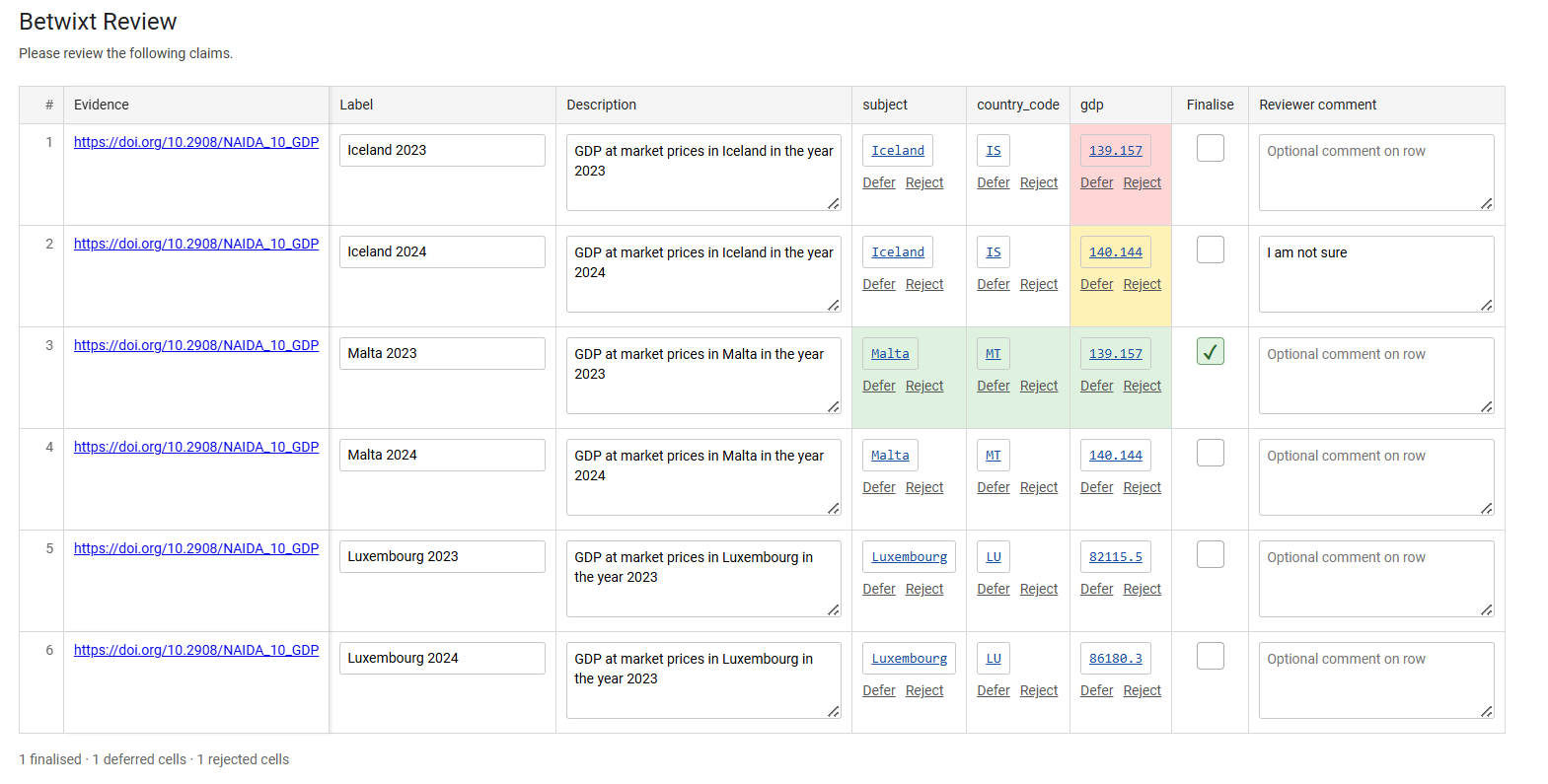
You can also download a finalised version of the review at https://usebetwixt.com/examples/small_countries_dataset_extended_1-finalised.html.
The review interface does not depend on whether the candidate dataset originated in R, Excel, Python, a database, or another system. The candidate-data contract provides the boundary between data preparation and human review.
Starting from an empty template
When preparing a new dataset manually, Betwixt can generate an empty table with a conforming column structure.
template <- create_candidate_template(
  columns = c("country_code", "gdp"),
  context = c("year", "unit")
)

template
## [1] row_number evidence_url evidence_media_url
## [4] evidence_text label description
## [7] subject subject_range subject_definition
## [10] country_code country_code_range country_code_definition
## [13] gdp gdp_range gdp_definition
## [16] year unit
## <0 rows> (or 0-length row.names)The template can then be written using an ordinary file-format tool:
utils::write.csv(
  template,
  "candidate_template.csv",
  row.names = FALSE
)
The resulting file can be populated in a spreadsheet application and subsequently read and validated in exactly the same way as the example above.
You can download the template from https://usebetwixt.com/examples/candidate_template.csv.
A portable data contract
The externally authored workflow can therefore be summarised as:
download or create → edit → read → validate → review
Betwixt is responsible for defining and validating the candidate-data structure and for turning conforming candidate data into a human review task. File formats and file input/output remain the responsibility of the surrounding data ecosystem.
This allows the same candidate-data contract to be used across spreadsheet, R, Python, database, and other workflows without requiring a Betwixt-specific interchange format.